Every track you play is in a musical key, and when two playing tracks sit in clashing keys their melodies, basslines and chords fight each other — that audible tension is what makes an otherwise tight blend sound amateur. Harmonic mixing is the practice of choosing your next track so the keys agree, and the Camelot Wheel is the tool that makes it a matter of simple number-and-letter math rather than music theory. This article is the practical how-to: what the wheel is, the full set of compatibility rules, and how to apply them in a real set. For the underlying theory of what a key actually is, see the sibling Musical Keys for DJs article.
What Harmonic Mixing Actually Is
Harmonic mixing — also called mixing in key — means matching the keys of the tracks in your mix so they sound consonant rather than dissonant. As Wikipedia's overview describes it, it is a DJ technique of matching the musical keys of tracks in a mix to avoid dissonance and create harmonious blends or mashups. When two tracks share the same key or a closely related one, their notes overlap, so a long blend where both tracks play together for 16 or 32 bars sounds smooth and intentional. When the keys clash, you get that out-of-tune wince that can empty a floor.
Every piece of music is built from a key: a set of notes that belong together, anchored on a home note (the tonic) and coloured either major (brighter) or minor (darker). You do not need to read music to mix harmonically — that is the entire point of the Camelot system — but if you want the foundation on what major, minor and relative keys are, read the Musical Keys for DJs article first. Here we assume you know a key exists and focus on the wheel and the rules.
Harmonic mixing works on whole tracks, but also on acapellas, vocal loops, samples and basslines layered in mashups. It is one of the techniques the world's top DJs use, popularised heavily through Mixed In Key software. The company's own Harmonic Mixing Guide says it kicked off the harmonic-mixing revolution in 2006, and calls harmonic mixing combined with energy-level-ranked selection the professionals' secret weapon, naming users such as David Guetta, Armin van Buuren and Kaskade.
What the Camelot Wheel Is
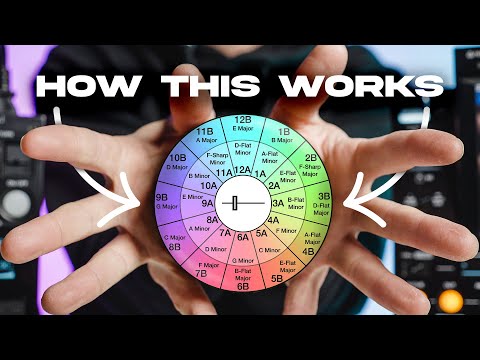
The Camelot Wheel is a DJ-friendly relabelling of the circle of fifths — the centuries-old diagram that arranges the 12 musical keys so that neighbours share the most notes. Instead of remembering sharps, flats and enharmonic spellings, the wheel gives every one of the 24 major and minor keys a simple code.
The wheel was created by Mark Davis, a Californian DJ who was an early adopter of harmonic mixing and ran the business Camelot Sound. The movement itself began earlier: in 1986 Stuart Soroka introduced DJs to harmonic mixing through Harmonic Keys magazine, published in Key West, Florida. For an annual subscription of $180, subscribers received a magazine every six to eight weeks plus key-labelled jacket labels for their records, and the publication had built more than 3,000 keys into its database before it ceased in early 1988. Davis found the magazine's overlay chart hard to memorise and, as he recounts in the Mixed In Key interview with Mark Davis, had a 1991 epiphany: the chart could be laid out as a circle, like the face of a clock, and by assigning a number to each key he would no longer have to memorise key relationships, because finding compatible keys would become as easy as reading the time. He saw this as an improvement on the original 17th-century circle of fifths. The system was later built into Mixed In Key software, launched in 2006, which kicked off the modern harmonic-mixing revolution and made the Camelot Wheel the de facto standard.
Reading the Codes
Each key gets a code made of a number from 1 to 12 (like the hours on a clock) plus a letter. The letter A means a minor key and sits on the inner ring; the letter B means a major key and sits on the outer ring. So A minor is 8A and C major is 8B. The number encodes the circle-of-fifths position, and crucially, a major key and its relative minor — which share all the same notes — sit at the same number: 8A (A minor) and 8B (C major) are relatives, as are 9A (E minor) and 9B (G major), and so on around all twelve positions. Mixed In Key's own material confirms major keys on the outer circle, minor on the inner, and the 1 to 12 clock numbering.
Under the labels, moving one step clockwise on a ring travels up a perfect fifth (seven semitones); one step counter-clockwise travels up a perfect fourth. Those are the two smoothest movements between keys, which is exactly why adjacent codes mix well.
The Core Compatibility Rules
These are the safe, well-established moves. From any starting code you have four reliable options: the same code, one step up, one step down, and the relative switch. Mixed In Key sums it up neatly — from 5A you can slide effortlessly to 4A, 6A or 5B.
The table below uses 8A (A minor) as the worked example.
| Move | Example from 8A | Effect |
|---|---|---|
| Same code | 8A → 8A | Perfect match, zero key change |
| Up one (+1, same letter) | 8A → 9A | Subtle lift, very smooth |
| Down one (−1, same letter) | 8A → 7A | Subtle, relaxed shift |
| Relative (same number, switch letter) | 8A → 8B | Mood change, minor to major |
Rule 1 — Same Code
Mixing into a track with the identical Camelot code is the most compatible move possible. Both tracks share the same notes, so any overlap is consonant and you can blend for as long as you like. The trade-off is that staying in one key for too many tracks can feel static.
Rule 2 — Adjacent on the Wheel (±1, same letter)
Move one hour up or down while keeping the letter: 8A goes to 7A or 9A. Adjacent keys differ by only one note in the scale, so the change is subtle enough that most listeners never consciously notice it — this is the most common move in professional sets. Walking steadily clockwise (8A → 9A → 10A → 11A) creates a gradual upward harmonic progression through a set; counter-clockwise does the reverse. The wheel wraps, so 12A → 1A is also adjacent.
Rule 3 — Relative Major/Minor (same number, switch letter)
Keep the number, switch the letter: 8A ↔ 8B. Because relative keys share all seven notes but centre on different tonics, the transition stays harmonically smooth while shifting the mood — minor to major lifts and brightens, major to minor darkens and drives. It is the cleanest way to change emotional colour without changing the harmonic centre.
Together these are the moves most guides and DJ tools describe as the safe rules. Everything beyond them is creative territory.
Advanced and Creative Moves
These work, but they are not guarantees — they depend on the specific tracks and are best kept to short, fast blends rather than long overlaps. Treat them as seasoning.
Energy Boost (+2 and +7)
The documented energy boost raises the pitch into a higher key for an immediate lift on the floor. Mixed In Key's advanced techniques chapter describes two variants. To go up two semitones (a whole tone), add 2 to your Camelot number: 5A → 7A. To go up one semitone, add 7: 2A → 9A. Mixed In Key notes that a two-semitone jump tends to be a little safer than a one-semitone mix, though both work well if you manage the blend with your ears open, and adds that a boost is best mixed quickly because the melodies will eventually clash. This is the same key-climb modulation pop music has used for decades. Moving the opposite way (down two codes) drains energy and can signal that a set is winding down — powerful, but risky mid-set.
The Diagonal and the +4
Mixed In Key documents two further moves credited to working DJs. The diagonal move shifts both number and ring at once: 8B into 9A, or 9A into 8B, works because the individual notes are harmonically related — the rule is add one when going B→A (5B → 6A) or subtract one when going A→B (8A → 7B). Note that not every diagonal works: 8B → 7A clashes because those scales contain dissonant intervals. The +4 move is one Mixed In Key attributes to David Guetta: add four to your current Camelot code for unusual but sometimes compelling results — mixing from 10B into 2B sounds dissonant at first, yet occasionally works. It needs testing with simple-melody tracks before you trust it in a set.
The headline caveat for all advanced moves: experiment at home first, blend quickly, and use them sparingly. They are rule-breaks for effect, not everyday transitions.
How to Use It in Practice
The workflow is the same regardless of software. First, analyse your library so every track carries a key. Every major platform now detects key: rekordbox, Serato DJ and Traktor all do it during analysis, and the dedicated analyser Mixed In Key writes Camelot codes (plus an Energy Level rating) straight into the file's ID3 tags so they travel with the track.
Second, set your software to show Camelot codes. In rekordbox, AlphaTheta's help centre confirms you go to Preferences, then View, then Key display format, and choose Alphanumeric to get 1A/1B-style codes. In Serato DJ Pro, open Settings, then Library + Display, then Show Key As, and pick Camelot. Traktor's key field shows Musical or Open Key rather than Camelot, so Traktor users either learn the Open Key equivalents or write Camelot codes into a text field such as Comments with an analyser.
Third, sort and plan. Sorting a prep crate by BPM and then by key puts compatible, tempo-matched tracks next to each other so you can see your options at a glance. In Serato, secondary-sorting by key arranges your library in harmonic order; Traktor has a shortcut that filters the library to harmonically compatible tracks. From whatever is playing, your safe next picks are always the same four: same code, ±1, or the relative.

Energy, Mood and Knowing When to Break the Rules
Moving around the wheel does more than avoid clashes — it shapes the emotional arc of a set. A ±1 step is a near-invisible lift or settle; a relative A↔B switch changes mood without changing harmonic centre; a +2 or +7 boost is a deliberate jolt of energy before a peak. Many DJs combine the Camelot system with an energy-level rating to plan both harmony and intensity across a night.
Harmonic mixing is a tool, not a law. There are good reasons to break it. Genre changes (deep house into techno) carry enough sonic contrast that a key clash barely registers. A deliberate clash at a peak moment can create impact. And if you cut quickly during a breakdown, or mix only percussion against percussion — intro drums over outro drums with no melodic overlap — key matching barely matters because there are few pitched elements to clash. Key compatibility is also only one factor: a harmonically perfect transition with a big tempo jump or a jarring energy mismatch usually sounds worse than a minor key clash between two tracks that otherwise belong together. The rule of thumb is to manage clashes with technique — quick cuts, EQ to isolate elements, effects, and phrasing so arrangements line up on 16- or 32-bar boundaries.
Open Key and Other Notation Systems
The Camelot Wheel is the most common system but not the only one. Traktor uses Open Key notation, which labels keys 1m to 12m (minor) and 1d to 12d (major) — the d/m comes from the German dur/moll for major/minor. Open Key maps the same 24 keys as Camelot; the difference is only where the numbering starts, so it is a one-to-one relationship (for example, 8A in Camelot corresponds to 1m in Open Key). The compatibility rules are identical in both systems — adjacent numbers and same-number letter switches — so you can mix systems by thinking in numbers and letters. As DJ TechTools' coverage notes, the two scales line up directly. Serato, meanwhile, can display Camelot, Open Key, Classical (musical) or the original tag, so you can pick whichever notation you think in.
Pitch, Key Lock and Shifting Keys
Changing a track's pitch changes its key. Speed a track up and the key rises; pitching up roughly a semitone moves it one notch (in semitone terms, +7 on the Camelot number). That matters because beatmatching by ear without correction will detune a carefully planned harmonic blend. The fix is key lock — called Master Tempo on Pioneer/AlphaTheta CDJs and rekordbox — which holds the track's key steady while you change tempo. Keep it on for harmonic mixing, but be aware that pushing tempo too far (beyond roughly ±6 to 8%) degrades audio quality as the time-stretching algorithm strains.
You can also use pitch deliberately. Advanced DJs nudge a track's pitch to bring it into a compatible key, and software key-shift tools — such as Serato's Key Shift and Key Sync with the Pitch 'n Time expansion — transpose a track by semitones so it lands in key with what is playing, showing a blue indicator when the result is harmonically suitable. This is powerful but easy to overdo: large shifts introduce audible artefacts.
Limitations and Caveats
The Camelot Wheel gives you probabilities, not guarantees. Key detection is imperfect: algorithms disagree, and tracks that modulate, have long ambient intros, or use complex harmony are easy to mislabel. One comparison of 200-plus tracks across three platforms found only 39% of keys matched across all three — 45% of Serato's analyses differed from Mixed In Key and 38% of rekordbox's also differed — with Mixed In Key consistently the most accurate. So always verify with your ears: if a transition sounds wrong despite matching codes, the key data is probably wrong.
Two same-key tracks can still clash. Harmonic compatibility and arrangement compatibility are different things: two dense basslines or two competing lead melodies in the same key will still sound muddy. And minimal tracks that use only a few notes can sometimes work across incompatible keys precisely because there is little to clash. The wheel is a fast, reliable shortcut for track selection — but phrasing, energy, EQ and your own ears are the rest of the craft.
Key takeaways
• The Camelot Wheel relabels the circle of fifths: number 1–12 plus a letter (A = minor/inner, B = major/outer); A minor = 8A, C major = 8B, and relatives share a number.
• The safe core rules from any code: same code, ±1 with the same letter, and the relative switch (same number, other letter).
• Advanced moves — +2 and +7 energy boosts, the diagonal, the +4 — work but need fast blends and prior testing; keep them rare.
• Set your software to show Camelot (or Open Key in Traktor), keep key lock on, and sort by BPM then key to plan transitions.
• Detection is imperfect and the wheel gives probabilities, not guarantees — trust your ears, and treat harmonic mixing as one tool alongside phrasing, energy and EQ.
Ready-made, exclusive EDM tracks with full rights — released as your own.
