Every digital audio file is built on two numbers you have probably seen written like "44.1 kHz / 16-bit" without knowing exactly what they promise. Those two specifications — sample rate and bit depth — describe how a continuous, real-world sound was frozen into data your computer and CDJ can store and replay. Understanding them tells you why CD quality sounds transparent, why your DAW records at 24-bit, and why a hi-res file is usually a bigger number rather than a better-sounding one. This guide explains both specs clearly, then gets practical about what matters when you are producing tracks versus playing them out.
From Analog Sound to Digital Data
Sound in the real world is analog: a continuous, smoothly varying change in air pressure. A computer cannot store something continuous and infinite, so it captures the waveform as a long series of discrete snapshots through a process called analog-to-digital conversion (ADC). Two independent measurements define each snapshot, and they map neatly onto the two axes of a waveform graph.
Sample rate works along the horizontal, time axis: it sets how often a snapshot is taken. Bit depth works along the vertical, amplitude axis: it sets how precisely each snapshot's level is measured. A useful mental image is a grid laid over the waveform — sample rate is how many vertical grid lines there are per second, and bit depth is how finely spaced the horizontal lines are. Together they determine how faithfully the digital copy represents the original, and together they define the data rate of uncompressed audio.
It is worth separating these two specs from bitrate, which people constantly confuse with them. Bitrate is the amount of data per second of audio, and for uncompressed PCM it is simply sample rate × bit depth × channels — a CD works out to 1,411 kbps. We cover that math, lossy versus lossless, and codecs like MP3 and AAC in the companion Bitrate and Audio Quality article, and the container formats themselves (WAV, AIFF, FLAC) in Audio File Formats for DJs. This article stays focused on the two specs that feed those numbers.
Sample Rate and the Nyquist Theorem
Sample rate is the number of samples captured each second, measured in hertz or kilohertz. A 44.1 kHz file contains 44,100 amplitude snapshots per second; a 48 kHz file contains 48,000. The obvious question is how many snapshots are enough, and the answer comes from a piece of mathematics that underpins all digital audio.
The Nyquist–Shannon sampling theorem states that to capture a given frequency accurately you must sample at more than twice that frequency. Half the sample rate is therefore the highest frequency the system can represent — the Nyquist frequency. At 44.1 kHz that is 22.05 kHz; at 48 kHz it is 24 kHz. Because healthy young human hearing tops out around 20 kHz, a sample rate of about 40 kHz already covers everything we can hear.
So why the odd 44.1? Two reasons. First, the rate was inherited from early PCM adaptors that stored digital audio on video tape — beginning with the Sony PCM-1600 in 1979, which used U-matic video recorders. The number falls directly out of the NTSC video format: 245 active lines per field × 60 fields per second × 3 samples per line equals 44,100, the highest usable rate compatible with both NTSC and PAL video. Second, the extra margin above 40 kHz gives the anti-aliasing filter room to work. That filter is essential: if frequencies above the Nyquist limit reach the converter, they fold back into the audible range as false tones called aliasing. To prevent this, a low-pass anti-aliasing filter removes content above Nyquist before conversion, and real filters need a few kHz of transition space to roll off without cutting into audible frequencies — which the gap between 20 kHz and 22.05 kHz provides.
The Common Sample Rates
Here is how the standard rates line up against what they can capture and where they are used.
| Sample rate | Captures up to | Typical use |
|---|---|---|
| 44.1 kHz | 22.05 kHz | CD, music streaming/distribution |
| 48 kHz | 24 kHz | Video, film, broadcast, pro audio |
| 88.2 / 96 kHz | 44.1 / 48 kHz | Hi-res, recording/mixing headroom |
| 176.4 / 192 kHz | 88.2 / 96 kHz | Specialised production, archival |
The higher double (88.2/96 kHz) and quad (176.4/192 kHz) rates do not capture more audible detail — humans cannot hear up to 48 kHz, let alone 96 kHz. Their real value is in production. A higher Nyquist limit pushes aliasing artifacts from nonlinear processing (distortion, saturation, hard limiting) and from synthesis far above the audible band, and it gives gentler anti-aliasing filters more room. They also help when you pitch-shift or time-stretch dramatically, because there is more high-frequency headroom to pull down. The cost is real: doubling the sample rate doubles file size and processing load. Many engineers now sidestep the issue by working at 44.1 or 48 kHz and letting individual plugins oversample internally only where needed.
Bit Depth and Dynamic Range
If sample rate is about how often you measure, bit depth is about how precisely you measure each sample's amplitude. It is the number of binary digits used to store each sample, and it sets how many distinct amplitude values are available. The math is exponential: 16-bit gives 2^16 = 65,536 possible levels, while 24-bit gives 2^24 = 16,777,216 levels. A 32-bit float file uses an entirely different scheme (more on that below).
The single most important consequence of bit depth is dynamic range — the span between the loudest signal the system can represent and the noise floor beneath it. Each bit adds roughly 6.02 dB of dynamic range. The textbook figures are 16-bit ≈ 96 dB and 24-bit ≈ 144 dB. (A more precise formula is 6.02 × bits + 1.76 dB, which yields about 98 dB and 146 dB; the rounded 96/144 figures are the ones you will see most often.) Critically, higher bit depth does NOT make audio smoother or add resolution to the waveform — once converted back to analog, a 16-bit and 24-bit signal are equally smooth. The only thing more bits buy you is a lower noise floor.
Quantization Noise and Dither
When a sample's true amplitude falls between two available levels, it gets rounded to the nearest one. That rounding error is quantization error, and at low bit depths it produces an unpleasant, gritty distortion that is most audible in quiet passages and fades. The fix is counterintuitive: you add a tiny amount of low-level random noise called dither before reducing bit depth. Dither randomises the rounding so the harsh, signal-correlated distortion is replaced by a constant, benign noise the ear ignores easily — and it even lets signals quieter than one bit survive. You apply dither whenever you reduce bit depth, typically as the last step when bouncing a 24-bit mix down to a 16-bit master.
The Common Bit Depths
| Bit depth | Amplitude levels | Dynamic range / role |
|---|---|---|
| 16-bit | 65,536 | ~96 dB; CD and distribution standard |
| 24-bit | 16,777,216 | ~144 dB; recording/production standard |
| 32-bit float | floating point | Huge range; DAW/recorder internal use |
For context, the dynamic range of human hearing spans roughly 120 dB or more from the threshold of hearing to the threshold of pain, and most music uses only 10 to 20 dB of dynamic range at any moment. The 96 dB of 16-bit already comfortably exceeds the usable dynamic range of nearly any listening environment — and with noise-shaped dither its perceived range climbs toward 120 dB — which is why CD quality is more than enough for finished, distributed music. The 144 dB of 24-bit exceeds the noise performance of essentially any microphone or preamp, so the point of 24-bit is not that you will use all of it — it is headroom. When recording, you can set conservative levels well below clipping and still keep the noise floor inaudibly low, and that headroom survives through many stages of mixing and processing.
32-bit Float: Why It Exists
32-bit float deserves its own note because it behaves differently from integer formats. Instead of a fixed grid of levels, it stores each sample in floating-point notation (a sign, an exponent, and a mantissa), giving a theoretical dynamic range exceeding 1,500 dB. In practice this means two things. First, inside a DAW, intermediate gain changes effectively never clip — you can push a channel far past 0 dBFS internally and pull it back with no damage, which is why most DAWs mix in 32-bit float. Second, on modern 32-bit float field recorders, you barely need to set input levels: clipping in the file becomes nearly impossible and quiet sounds can be raised later without dredging up noise. The catch is that 32-bit float is a production and capture format, not a delivery format — and as we will see, it can trip up DJ gear.
Sample Rate, Bit Depth, and File Size Together
Together these two specs define the quality and data rate of uncompressed audio. CD quality is precisely 44.1 kHz / 16-bit, two channels — which is where the 1,411 kbps bitrate comes from. Hi-res audio is formally defined as anything exceeding CD spec. There is no single universal standard, but the most recognised benchmark is the Hi-Res AUDIO logo introduced in 2014 by the Japan Electronics and Information Technology Industries Association (JEITA) and administered by the Japan Audio Society, which sets a minimum of 24-bit depth and a 96 kHz sample rate; the Audio Engineering Society and Consumer Technology Association cite the same 24-bit/96 kHz figure. The trade-off is straightforward: higher numbers mean bigger files. A stereo minute at 44.1 kHz/16-bit is roughly 10 MB; the same minute at 96 kHz/24-bit is around 33 MB. Whether those bigger files sound better on playback is the heart of the hi-res debate.
The Hi-Res Audio Debate
This is where DJs and producers most often get steered wrong by marketing, so it is worth being precise and evidence-based. The claim that 24-bit/96 kHz or 24-bit/192 kHz playback sounds audibly better than well-mastered CD quality does not hold up well in controlled, level-matched, blind listening tests.
The most cited study is Meyer and Moran's 2007 paper in the Journal of the Audio Engineering Society (Vol. 55, No. 9), "Audibility of a CD-Standard A/D/A Loop Inserted into High-Resolution Audio Playback." Over a year of double-blind tests on high-end systems, with levels matched to within 0.1 dB and switched through an ABX comparator, listeners — including recording engineers and audiophiles — could not reliably detect when a CD-quality (16-bit/44.1 kHz) conversion stage was inserted into the playback of hi-res SACD and DVD-Audio sources. The authors reported that the CD-quality loop was undetectable at normal-to-loud listening levels for any subject on any system, its noise audible only at very elevated levels. The study has well-known criticisms — notably whether the source recordings genuinely exceeded CD fidelity — so it should not be treated as the final word, but its core result is consistent with theory.
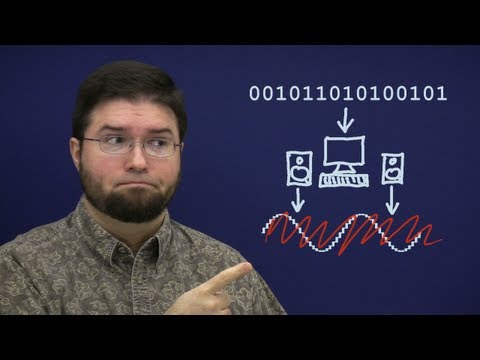
That theory is laid out clearly by Chris "Monty" Montgomery of Xiph.Org in his widely read explainer "24/192 Music Downloads … and why they make no sense". His argument is that since 44.1 kHz already captures the entire audible band and 16-bit dither delivers a noise floor below what any room or playback system reveals, distributing music at 24/192 offers no audible benefit — and can even be marginally worse, because ultrasonic content can cause intermodulation distortion in amplifiers and speakers. His companion video demonstrates these points on real lab equipment.
The honest, balanced conclusion: higher sample rates and bit depths have genuine, defensible uses in recording, mixing and mastering, but for playback the audible advantage of hi-res over a good CD-quality master is minimal to nonexistent for the vast majority of listeners. When people do hear a difference, it usually traces to a different master, an unmatched level, or missing dither — not to the format itself.
What Actually Matters for DJs
For DJ playback, the practical priorities are different from the studio. CD quality — 44.1 kHz, 16-bit — is effectively transparent for playing out, and 24-bit lossless files are fine too. Chasing 96 kHz or 192 kHz files for a DJ set buys you nothing audible and just eats storage. What genuinely matters is sourcing clean, full-quality files from a good source and managing your levels properly; a great 44.1/16 master beats a hi-res file made from a poor source every time.
Gear compatibility, however, is a real and avoidable trap. The industry-standard Pioneer DJ CDJ-3000 plays WAV, AIFF, FLAC and Apple Lossless at sampling rates of 44.1/48/88.2/96 kHz and bit depths of 16 or 24 bit only. Two consequences follow directly:
• 32-bit float WAVs may not load. DAWs like Ableton Live and Logic Pro often export 32-bit float by default. The CDJ-3000 supports only 16- and 24-bit PCM, and will reject a 32-bit float file — often silently, with the track appearing in the library but failing to load (error E-8305). Always export DJ-ready files as 16- or 24-bit.
• Files above 96 kHz are unsupported. A 176.4 or 192 kHz hi-res download exceeds the player's maximum; the CDJ-3000 simply skips the track without displaying an error, so convert it down before a gig.
Note a point of confusion: Pioneer describes the CDJ-3000 as unifying its internal audio processing to "96 kHz/32-bit floating" — but that refers to the player's internal DSP engine, not the files it accepts. Software DJ platforms are more flexible (Serato DJ Pro and Traktor handle WAV/AIFF/FLAC at common rates and bit depths, with the operating system or interface setting the playback sample rate), but if your set might ever touch a CDJ, prepare files to the CDJ envelope.
Practical Guidance and Common Mistakes
For producers, a simple, defensible workflow covers almost everything:
• Record and mix at 24-bit (or 32-bit float if your interface and DAW support it). This is where bit depth genuinely pays off, giving you safe headroom against clipping and a low noise floor while tracking and processing.
• Use 44.1 kHz or 48 kHz as your project sample rate. Pick 44.1 kHz for music headed to streaming and CD; pick 48 kHz if the work is going to video or film. Both are professional and transparent. Only go to 88.2/96 kHz if you have a specific reason — heavy pitch/time manipulation, synthesis-heavy sound design, or archival.
• Export final masters at 16-bit/44.1 kHz with dither for general distribution (many platforms also accept 24-bit). Apply dither only at the final bit-depth reduction.
• Match your project sample rate to your sources and destination to avoid unnecessary conversions, and remember that downsampling (e.g. 48 to 44.1 kHz) sounds better than upsampling.
The most common mistakes follow naturally: exporting a 32-bit float WAV and handing it to a CDJ; performing needless sample-rate conversions back and forth; conflating sample rate with bitrate (they are different things); and chasing hi-res numbers instead of investing in good source material, solid gain staging, and careful mastering — which affect your sound far more than any spec on the file.
Key takeaways
• Sample rate = snapshots per second (time); bit depth = precision of each snapshot (amplitude/dynamic range).
• Nyquist: 44.1 kHz captures up to ~22.05 kHz, covering the ~20 kHz limit of human hearing.
• Each bit ≈ 6 dB of dynamic range: 16-bit ≈ 96 dB, 24-bit ≈ 144 dB; dither masks quantization noise when reducing bit depth.
• Produce at 24-bit / 44.1 or 48 kHz; export masters at 16-bit/44.1 kHz with dither.
• For playback, CD quality is transparent — hi-res offers little to no audible benefit in blind tests.
• Watch the 32-bit float gotcha: convert DJ files to 16- or 24-bit so they load on CDJs.
Ready-made, exclusive EDM tracks with full rights — released as your own.
