Studio monitors are the single most important link between your music and your ears, yet they are also the easiest piece of gear to buy badly. Whether you produce your own tracks, prepare and edit other people's music, or simply want to hear what you are really mixing, the goal is the same: a speaker that tells the truth. This guide explains what matters when choosing studio monitors for DJs and producers, why the room often matters more than the monitor, and how to read the specs without being dazzled by marketing.
What Studio Monitors Actually Are
A studio monitor is a loudspeaker engineered for a flat, accurate, uncoloured frequency response. The idea is that you hear the recording as it really is, with no frequency range artificially boosted or cut, so you can make reliable decisions about your mix. This is fundamentally different from two other speaker types you might already own. Hi-fi and consumer speakers are deliberately voiced to sound pleasing, often hyping the bass and treble to flatter whatever is played through them. PA and DJ-booth speakers are built for loudness and coverage, designed to fill a room and excite a crowd rather than reveal detail. As Sound On Sound's analysis of monitors versus hi-fi speakers points out, a neutral tonal balance is the whole point of a monitor, even though no speaker is ever perfectly flat.
Most monitors you will consider are nearfield monitors — compact speakers designed to be listened to up close, typically three to five feet away. Listening in the nearfield means you hear mostly the direct sound from the drivers and far less of the sound reflected off your walls, floor and ceiling. That minimises the influence of an untreated room, which is exactly why nearfields became the standard for home studios and project rooms. The trade-off is bass extension and maximum volume, but for most bedroom and small-studio setups that is a price worth paying.
Active Versus Passive Monitors
Monitors come in two power configurations, and for almost every DJ or home producer the choice is easy.
Active (powered) monitors have amplifiers built into the cabinet. The best part is that they are usually bi-amped: a separate amplifier drives the woofer and another drives the tweeter, each amp matched to its driver through an active crossover placed before amplification. As the Wikipedia entry on bi-amping explains, splitting the signal electronically before the amps avoids the inefficiency of a passive crossover and reduces intermodulation distortion. The manufacturer has tuned the amp, crossover and driver together as one optimised system, so you simply plug in a signal and go.
Passive monitors contain no amplifier; they need a separate external power amplifier, and you take responsibility for matching that amp to the speakers. This adds cost, cabling and decisions. There are excellent passive systems in high-end studios, but for a home studio or DJ booth, active monitors are the clear recommendation.
| Factor | Active monitors | Passive monitors |
|---|---|---|
| Amplification | Built in, often bi-amped | Separate external amp needed |
| Setup | Plug and play, factory-matched | You match amp to speakers |
| Best for | Home studios, DJs, most producers | High-end / custom installations |
Drivers, Woofer Size and Bass
Most nearfield monitors use a two-way design: a woofer for the lows and low-mids, and a tweeter (usually a 1-inch dome) for the highs, with a crossover splitting the signal between them, commonly around 2 to 3 kHz. Larger and more expensive monitors sometimes add a third driver in a three-way design dedicated to the midrange.
Woofer size is the spec that most directly shapes bass and the room you can use the monitor in. Common woofer diameters are 5, 6.5 and 8 inches, and the relationship is simple physics: a bigger cone moves more air and reaches lower. The Yamaha HS range illustrates this neatly — the 5-inch HS5 is quoted at 54 Hz to 30 kHz (−10 dB), the 6.5-inch HS7 reaches down to 43 Hz, and the 8-inch HS8 is quoted by Yamaha at 38 Hz to 30 kHz (−10 dB), or 47 Hz to 24 kHz at the tighter ±3 dB measurement, with a 2 kHz crossover and 120 W of bi-amped power (75 W LF, 45 W HF). Smaller woofers simply roll off in the bass earlier, which is why a 3-inch micro monitor or a 3.5-inch budget speaker struggles below roughly 55 to 80 Hz.
Bass is also extended by a port (a bass-reflex opening). Ports can be front-firing or rear-firing. Rear ports need breathing room: place a rear-ported monitor too close to a wall and the low end becomes boomy and exaggerated. Genelec's support guidance states that a monitor needs at least 50 mm (2 in) of clearance to the wall for full output from a rear bass-reflex port, while ideally keeping the front grille within 0.6 m (2 ft) of that wall; a common rule of thumb is to leave at least as much clearance as the port's diameter. Front-ported designs such as the KRK Rokit series and the IK Multimedia iLoud Micro are more forgiving when space is tight.
When a woofer cannot deliver the lows your music demands — and electronic genres like techno, drum and bass and hip-hop live in the sub-bass — a subwoofer can extend the system, creating a 2.1 setup. The stereo signal is typically routed through the sub, which handles the lowest frequencies and passes the rest up to the satellite monitors. But add a sub with caution: a poorly integrated or uncalibrated subwoofer in an untreated room creates more problems than it solves, because most small rooms already have serious response issues below 200 Hz. Treat the room first, then consider a sub.
Matching Monitor Size to Room
Bigger is not better. One of the most common mistakes is buying oversized monitors for a small room. An 8-inch monitor in a tiny bedroom will overload the space, exciting room resonances and producing bloated, unreliable bass that no amount of EQ will fully fix. The sound has to develop in the air before it reaches you, and a small room simply cannot accommodate that from a large speaker. A widely cited rule of thumb matches woofer size to floor area and listening distance.
| Woofer size | Suggested room | Typical use |
|---|---|---|
| 5-inch | Small bedroom, under ~10 m² | Desktop nearfield, tight spaces |
| 6.5-inch | Medium room, ~10–15 m² | Project studios, more low end |
| 8-inch | Larger room, over ~15 m² | Treated rooms, fuller bass |
For most home DJs and bedroom producers, a 5-inch monitor is the safe, sensible default. Step up to 6.5 or 8 inches only if you have the floor space, the listening distance and at least some acoustic treatment to control the extra low-frequency energy.
Room Acoustics and Placement
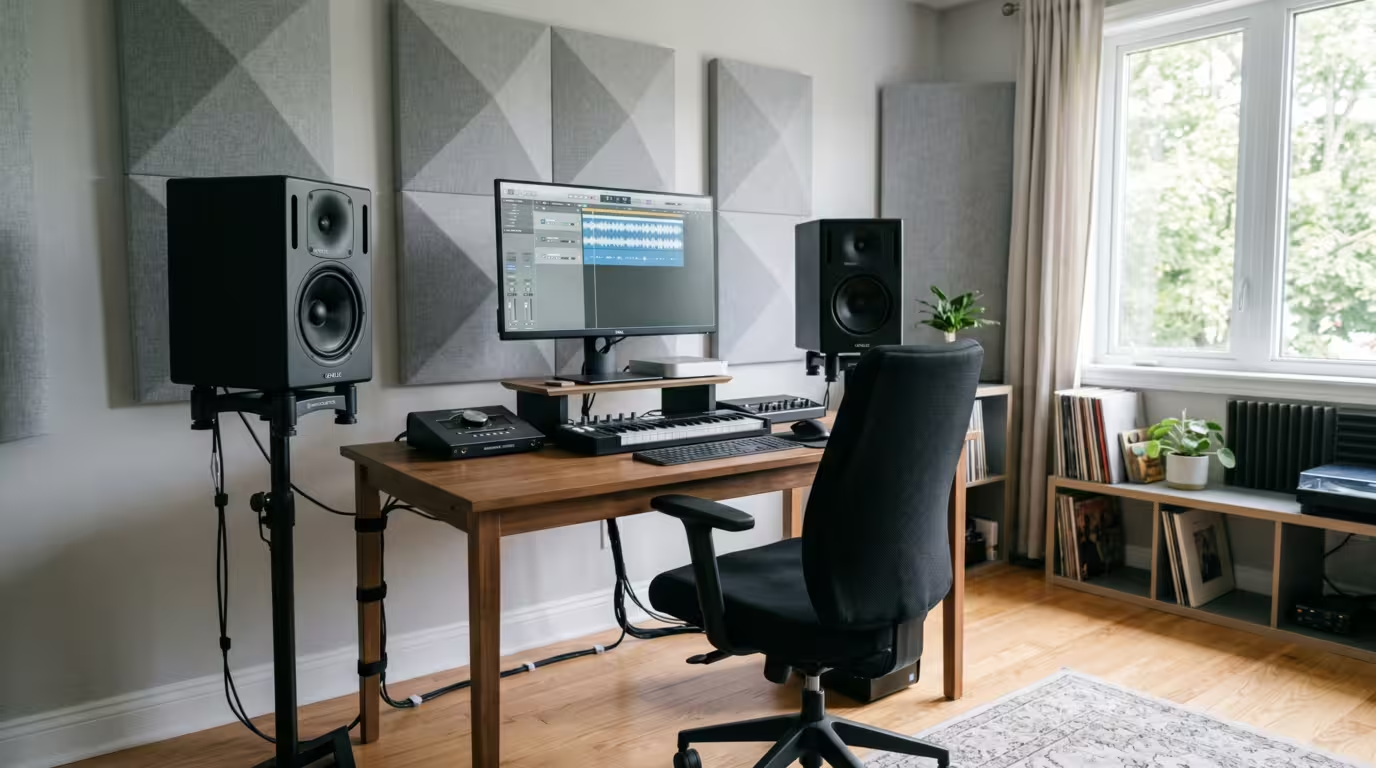
Here is the truth that no spec sheet tells you: your room and your placement matter more than which monitor you buy. A modest pair of monitors set up correctly in a treated room will outperform expensive monitors thrown carelessly onto a desk against a wall.
The Listening Triangle
Set your two monitors and your head to form an equilateral triangle — the distance between the two speakers should equal the distance from each speaker to your head. Genelec specifies a 60-degree angle between the left and right monitors, which means toeing each monitor inward about 30 degrees so the tweeters aim at your ears; KRK's setup manual likewise places monitors roughly 3 to 5 feet apart and angled at 60 degrees toward the listening position. Position them so the tweeters are at ear height — Genelec recommends the monitor's acoustical axis sit at ear level, usually between 1.2 and 1.4 metres from the floor. The setup should be symmetrical, with each monitor the same distance from its nearest side wall, so the stereo image is balanced. Universal Audio's monitor placement guide and ADAM Audio's positioning advice both stress that getting this geometry right costs nothing and transforms what you hear.
Boundaries, Modes and Treatment
Every nearby surface boosts the bass, and the effect is larger than most people expect. According to Genelec's monitor setup guidance, placing a monitor against one wall adds roughly +6 dB of low-frequency gain; in a corner where two walls meet, that can rise to about 12 dB; and with three close boundaries it can reach up to 18 dB. That is why corners are the worst place for a monitor, and why you should pull speakers away from rear and side walls wherever you can.
The deeper problem is room modes — resonances determined by the room's dimensions. As the Wikipedia article on room modes explains, most rooms have their fundamental resonances in the 20 to 200 Hz region, creating standing waves whose peaks and nulls make a given bass note far too loud in one spot and nearly absent a foot away. Axial modes, formed between two parallel walls, are the strongest. You cannot mix bass reliably when you are hearing the room rather than the music.
Practical fixes, in order of impact:
• Decouple the monitors from the desk with isolation pads or, better, stands, so vibration does not smear the sound through the desktop.
• Place absorption at the first reflection points on the side walls and ceiling — use the mirror trick: where a helper sliding a mirror along the wall reveals the tweeter, put a panel.
• Put bass traps in the corners to tame low-frequency build-up and modal peaks.
• Consider room-correction or calibration software (such as Sonarworks SoundID Reference, IK ARC, or a manufacturer system like Genelec's GLM) once you have done the physical basics. Correction helps, but it is no substitute for placement and treatment.
Connections and Specs That Matter
Studio monitors use balanced or unbalanced inputs, and the difference affects noise. Balanced connections — XLR and TRS (tip-ring-sleeve) — use three conductors and cancel out interference picked up along the cable, and they run hotter (typically several dB louder) than unbalanced. Unbalanced connections — RCA and TS — use two conductors and are more prone to hum and buzz, especially over longer runs or near computers and power supplies. Prefer balanced XLR or TRS whenever your source offers it; note that an XLR-to-RCA adapter makes the whole connection unbalanced.
Crucially, connect monitors to the right source at the right level. Feed them from your audio interface's outputs or your DJ mixer's or controller's booth or master output — line-level outputs. Never run a monitor into, or a line-level DJ source into, a phono input, which is designed for tiny turntable signals; doing so produces a distorted, dangerously loud signal that can damage gear. When comparing models, focus on these specs.
| Spec | What it tells you |
|---|---|
| Frequency response | Hz range plus the ± dB tolerance |
| Woofer / tweeter size | Bass extension and room suitability |
| Max SPL | How loud before distortion |
A frequency-response figure is only meaningful with its tolerance. A range quoted at ±3 dB is far more honest than the same numbers quoted at −10 dB, where the extremes are barely audible. Also weigh power (watts RMS, often split between woofer and tweeter), port type (front or rear), and dispersion (how wide the usable sweet spot is). Helpful extras include room-compensation switches (high-trim and low or room controls) that let you tame boundary effects.
What DJs Specifically Need
DJs sit on a spectrum. If you only mix existing tracks for your own enjoyment, you do not strictly need a flat reference monitor — a quality pair of powered speakers that sound good will serve, and some DJ-oriented monitors even offer a switchable club-like voicing alongside a flat mode. But if you produce, edit, prepare or re-edit tracks, accurate monitors pay for themselves: hearing music honestly is exactly what lets you judge a kick against a sub, spot a harsh top end, or decide whether a track you are buying will translate to a big system.
It is worth separating booth monitoring from production monitoring. In the booth you are often moving around, the priority is hearing the mix clearly against the room, and robustness and level matter. At the production desk you sit in a fixed sweet spot and accuracy is everything. Whichever you are doing, follow the golden rule of mixing: reference-check your work on multiple systems — headphones, your car, a phone, a club rig — because no single pair of speakers reveals everything.
Representative Monitor Lines
The lines below are described by their spec characteristics, not ranked. They are examples of where different monitors sit in the range of sizes, voicings and prices, so you can recognise the pattern when you shop. All are active nearfields.
The Yamaha HS series (HS5/HS7/HS8) carries the white-cone, NS10-derived look and a reputation for a fairly flat, revealing sound that exposes flaws rather than flattering them. All are two-way, bass-reflex, bi-amplified, with XLR and TRS inputs.
| Model | Woofer | Frequency response |
|---|---|---|
| HS5 | 5-inch | 54 Hz–30 kHz (−10 dB) |
| HS7 | 6.5-inch | 43 Hz–30 kHz (−10 dB) |
| HS8 | 8-inch | 38 Hz–30 kHz (−10 dB) |
The KRK Rokit series (RP5/RP7, now G4/G5) is hugely popular and known for a bass-forward voicing that DJs often enjoy. The RP5 G4 has a 5-inch Kevlar/aramid woofer and a 1-inch tweeter, is front-ported, and is bi-amped with Class-D power delivering 35 W to the bass driver and 20 W to the tweeter; it adds an onboard DSP-driven graphic EQ with 25 settings to help condition the acoustic environment, and the G5 introduces selectable Mix (flat), Create and Focus voicings. Its front port makes placement near a wall easier.
Genelec's 8000 series represents the compact, high-end end of the market — die-cast aluminium cabinets, an Iso-Pod decoupling base, and a famously flat, neutral sound. The 8010 (3-inch woofer), 8020 (4-inch), 8030 (5-inch) and 8040 (6.5-inch) step up in size and output; the 8030C, for instance, is a 5-inch bi-amplified nearfield quoted around 54 Hz to 20 kHz with room-compensation switches.
ADAM Audio spans two relevant lines. The budget T series uses the U-ART accelerated-ribbon tweeter with a rear-firing port: the T5V has a 5-inch polypropylene woofer quoted at 45 Hz to 25 kHz, while the T7V (7-inch) and T8V (8-inch) reach lower. The premium A series uses the handmade X-ART ribbon tweeter with onboard DSP — the A4V (4-inch woofer) is quoted at 58 Hz to 41 kHz (−3 dB) and the A7V (7-inch woofer) at 44 Hz to 41 kHz (−3 dB) with a 2.8 kHz crossover, both bi-amped with a hybrid amplifier and four-band room-adaptation EQ.
Focal's Alpha Evo line uses a Slatefiber cone woofer and an aluminium inverted-dome tweeter, with XLR, TRS and RCA inputs. The Alpha 50 Evo (5-inch) is quoted at 45 Hz to 22 kHz, the Alpha 65 Evo (6.5-inch) at 40 Hz to 22 kHz, and the Alpha 80 Evo (8-inch) at 38 Hz to 22 kHz (±3 dB).
At the affordable, compact end, Mackie CR and PreSonus Eris monitors target desktop and budget setups. The Mackie CR3-X pairs a 3-inch woofer with a powered-and-passive speaker arrangement, while the PreSonus Eris E3.5 uses a 3.5-inch woven-composite woofer and a 1-inch tweeter, with TRS, RCA and aux inputs and bass/treble trims, rolling off around 80 Hz. The IK Multimedia iLoud Micro Monitor is a tiny powered nearfield — a 3-inch woofer and three-quarter-inch tweeter, front-ported, with DSP and a quoted −3 dB point of 55 Hz — useful where space is at a premium or as a portable reference.
Whatever you choose, buy in matched pairs so the left and right channels are identical, and audition them in your own room if you can.
Key takeaways
• Studio monitors aim for flat, honest sound; hi-fi and PA speakers do not — match the tool to the job.
• For home and DJ use, choose active (usually bi-amped) nearfield monitors.
• Match woofer size to room: 5-inch for small rooms, larger only with space and treatment.
• Placement and room treatment matter more than the monitor — nail the 60-degree listening triangle, keep tweeters at ear height, pull away from walls, and treat reflections and corners.
• Use balanced XLR/TRS from an interface or mixer's booth/master output; never a phono input.
• Read frequency response with its dB tolerance, buy in matched pairs, and reference-check mixes on several systems.
Ready-made, exclusive EDM tracks with full rights — released as your own.
