Your first gig is rarely the peak-time slot you imagine. It is far more likely to be an early set in a bar or a small club, in front of a near-empty room, on gear you have never touched. That is good news: the opening slot is where you learn the craft with the lowest stakes and the most goodwill. This guide covers what actually happens at a first gig and how to prepare so that nothing technical surprises you.
What to Expect From a First Slot
Most first gigs are warm-up or opening slots. Your job is not to fill the floor — it is to set a tone, make the room feel inviting, and hand the next DJ a crowd that is ready to move. As the drum and bass DJ Mantra explained to Red Bull, the warm-up DJ exists to make the space feel inviting and help people relax and settle into the room they will spend the whole night in. The cardinal rule, repeated by working DJs everywhere, is simple: do not play the biggest tracks in your collection, and do not leave the next DJ stranded in an outrageous BPM range.
Set lengths vary by context. Club nights commonly run one to four hours of total programming split between DJs; festival slots run 30 to 90 minutes; a bar opener is often 60 to 120 minutes. A useful planning figure: a DJ plays roughly 15 to 25 tracks in a 60-minute set, with house and techno running fewer (around 12 to 15) and faster-mixed genres running more.
The energy arc matters more than any single track. Warm-up programming typically sits lower in tempo and energy — often in the 90 to 115 BPM range with an energy ceiling around 6 out of 10 — and rises in blocks of three or four tracks rather than on every transition. You are building a platform, not a peak.
| Context | Typical length |
|---|---|
| Bar opener / warm-up | 60–120 min |
| Club night (per DJ) | 1–2 hours |
| Festival slot | 30–90 min |
Knowing the Venue and the Gear
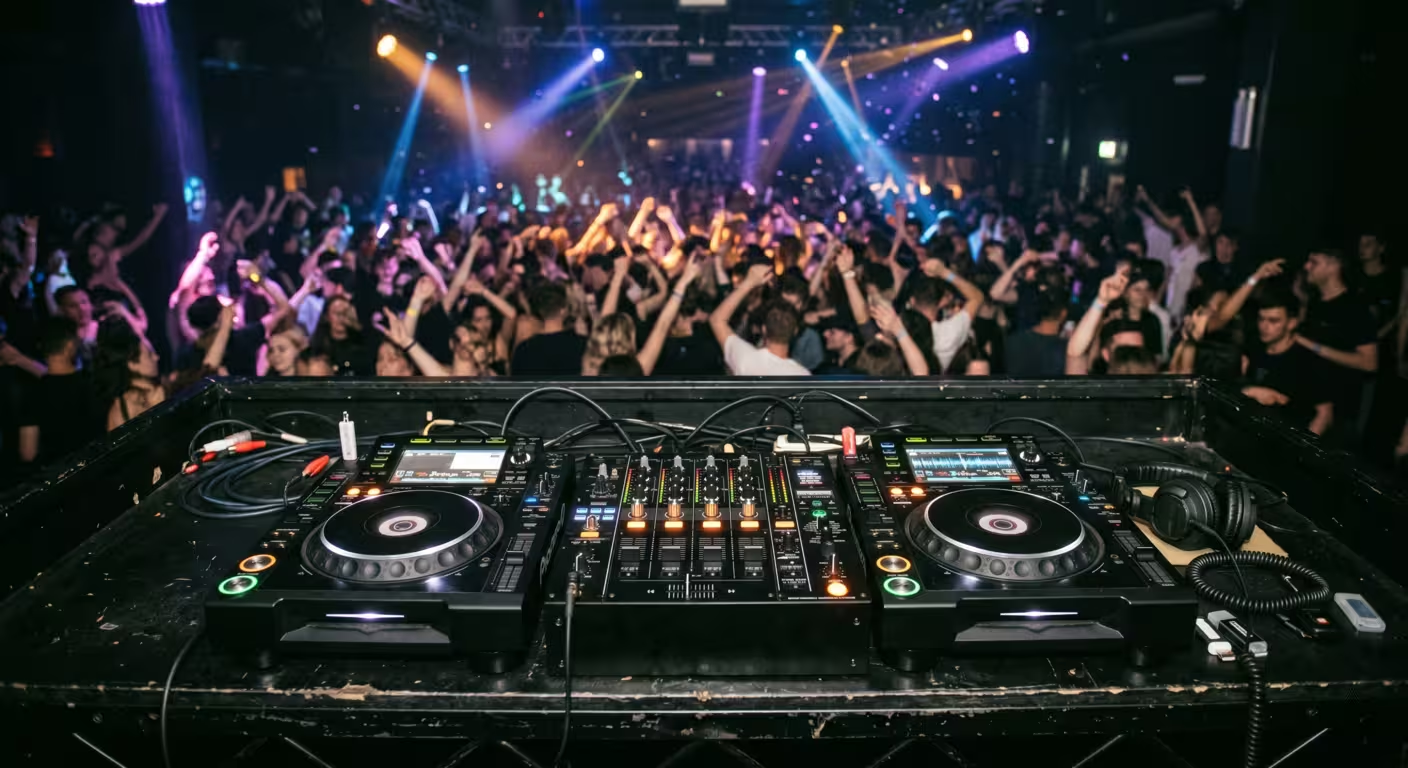
Before anything else, find out what you are playing on. The overwhelming majority of clubs run Pioneer DJ / AlphaTheta gear — typically CDJ players (the CDJ-2000NXS2, the flagship CDJ-3000, or the newer CDJ-3000X) feeding a DJM-series mixer such as the DJM-900NXS2 or its successor, the DJM-A9. Knowing which CDJ and which mixer are installed tells you almost everything about how you will prepare and connect.
If you learned on a controller, the jump to standalone CDJs and a club mixer can feel daunting because the controls are laid out differently and they connect differently. Ask the promoter or venue directly: what players, what mixer, and are you playing off USB, a laptop, or both? If you can, visit during an off-night and put your hands on the actual setup. Familiarity with the room and its acoustics also takes the edge off nerves.
Preparing Your Music and USBs
For a CDJ gig, your music lives on USB drives prepared with rekordbox, Pioneer's library-management software. rekordbox analyzes each track and writes the BPM, beatgrids, waveforms, cue points, and hot cues to the drive so the players display and perform correctly. You import and analyze tracks, build playlists, set your cues, then use Export mode to copy everything to the USB. Tracks must be analyzed before export, or you will lose waveform display and beatgrid features on the deck. If your library still needs work, start with building a DJ music library and preparing USBs for CDJs.
USB Formatting: FAT32 vs exFAT
The single most common first-gig disaster is a USB the CDJ refuses to read, and it is almost always a formatting problem. CDJs do not read NTFS — Windows' default format for large drives — at all. The safe, universal choice is FAT32 with a Master Boot Record (MBR) partition scheme, which works on every generation of CDJ. Pioneer DJ's own guidance is to prepare all sets with rekordbox; in CDM's reporting, DJ Lisa Smith (aka Noncompliant) notes that most USB read problems trace back to raw sticks that were never prepared in rekordbox.
exFAT is now supported, but only on newer hardware. The official rekordbox compatibility list names exactly these exFAT-capable units: the CDJ-3000X, CDJ-3000, OPUS-QUAD, OMNIS-DUO, XDJ-AZ, XDJ-XZ, and XDJ-RX3. Because you cannot guarantee which players a venue runs — and a tech may swap in an older deck as a fallback — FAT32 remains the safest bet for a first gig.
| Format | Use it when | Watch out for |
|---|---|---|
| FAT32 (with MBR) | You want universal CDJ compatibility | 4 GB per-file limit; 32 GB default cap in Windows tools |
| exFAT | You know the venue runs CDJ-3000/3000X or newer | Not read by older CDJs; needs current firmware |
Redundancy Is Not Optional
Bring backups, plural. Experienced touring DJs carry multiple prepared sticks — one DJ interviewed by CDM brings four, plus a fifth with the latest firmware — and keep rolling backups so a single corrupt drive never ends a set. Build at least two identical USBs, prepared separately, and keep a backup of your whole music library off the drive. SanDisk and other quality brands are recommended because cheap sticks corrupt more readily; USB 3.0 drives of 64 GB or smaller maximize compatibility. If you also DJ on a laptop, a phone with a pre-mixed emergency set and a headphone adapter is a cheap last line of defense.
What to Bring
Venues are unpredictable. The principle that professionals repeat is redundancy: a spare of everything that matters.
| Item | Why |
|---|---|
| Headphones plus a 1/8-to-1/4-inch adapter, and a backup pair | You cannot beatmatch without them; they disappear |
| Two or more prepared USBs | Your music and your insurance |
| Your own RCA cable | To plug a controller into the house mixer |
| Gaffer tape, a multitool, a small flashlight | Cable management, quick fixes, dark booths |
| Photo ID and earplugs | Door entry and hearing protection |
Gaffer tape deserves special mention: unlike duct tape it is fabric-based, heat-resistant, and leaves no residue, which makes it the universal booth problem-solver for securing cables and marking gear.
Arriving, Soundcheck, and the Handover
Turn up well before your set — early enough to greet whoever is on before you, check the booth, and never assume everything is perfect when you arrive. Walk the room, listen for loud and quiet spots, and get a sense of the crowd. If a DJ is already playing, notice their selection; some DJs will even let you glance at their play history so you do not open with a track they played five minutes earlier.
The handover is a piece of etiquette that cuts both ways. There is usually a one-or-two-more conversation a few minutes before your start time. Arrive in the booth roughly five minutes before you are due, introduce yourself, and stay out of the way until it is your turn. Do not set up your gear or plug in a USB during the previous DJ's last tracks if you can avoid it — it creates tension and can knock a cable. When you take over, you can fade in, or let their last track play out and lead a quick round of applause before starting.
Booth etiquette is straightforward and it is how promoters judge professionalism. Keep drinks away from the equipment — a single spill can end a night, and many venues bill the DJ for damage. Do not crowd the booth with friends. Be friendly to the in-house sound tech, who is there to make you sound better. Leave the booth as you would want to find it, with all cables present and working.
Connecting to the Club System
When you plug a controller into a club rig, you do not touch the venue's speakers — you plug into a spare channel on their mixer, exactly like another deck. Run an RCA cable from your controller's master output into a free line-level input on the house mixer. Crucially, a controller is a line-level source: never plug it into a phono input, which is designed for the low, RIAA-equalized signal from a turntable and will produce a loud, distorted mess. Bring your own RCA cable; do not assume the venue has a spare.
On a CDJ setup there is nothing to connect — your music is on the USB. You simply insert your drive into a free player and load. If the players are linked over Pro DJ Link (a wired Ethernet connection that lets players share one USB and sync data), be aware that the track on a given deck may be reading from a USB in a different deck. Per the AlphaTheta product documentation, you can link up to six players when using only CDJ-3000 units with a six-channel mixer such as the DJM-V10, or up to four when other models are in the chain. Pull the wrong stick and you can stop the music; on a CDJ-3000 the track keeps playing only as far as it has buffered. Know which player your drive is in before you remove it.
The booth monitor — the speaker pointed at you — has its own volume control on the house mixer, independent of the master the crowd hears. In a small bar with no separate booth system you will often just be set up near a main speaker that doubles as your monitor.
Gain Staging: Do Not Redline
Setting levels correctly is the difference between sounding professional and sounding like an amateur. The goal is a consistent, clean level with headroom — not the loudest possible signal.
The mechanics are simple. Set the channel's TRIM (gain) so the channel level meter peaks at the right spot, keep your channel faders up near the top, and leave the master alone in a club. Pioneer's DJM-900NXS2 operating instructions tell you to set the TRIM so the channel level meter peaks around 0 dB, and the MASTER LEVEL so the master meter peaks around 0 dB. On a DJM, the meter scale continues well above the 0 dB mark before clipping, so peaking around 0 dB is exactly what leaves headroom and keeps you out of the red. If the channel's CLIP indicator blinks, you are too hot — turn the TRIM down until it stops.
Redlining (clipping) does not make you louder; it degrades the sound and can trigger the system's protection. The DJM's peak limiter triggers at 0 dBFS, and most professional club systems have limiting and compression in place that will squash a clipped signal into something that sounds worse, not louder. The other half of the etiquette: in a club or festival, do not touch the master volume — that belongs to the sound engineer. If the room seems too quiet or too loud, ask the house engineer rather than reaching for the master.
A practical sequence for a controller into a house mixer: start your controller's master around 75%, then set the mixer channel's gain so peaks sit in the green-to-yellow, never the red. A constant low hum after connecting usually means a ground loop — run your laptop on battery or use a ground-loop isolator on the RCA line.
Reading the Room as an Opener
Your set is part of a bigger plan. If you build to your loudest, biggest tracks in the first hour, the next DJ has nowhere to go — and if a guest is playing later, never play their tracks or their own productions. Familiar but lower-energy selections, classic or undiscovered, get people comfortable without demanding the floor fill before it is ready.
Read the early signs of engagement: heads nodding, feet tapping, small movements at the edge of the floor or the bar, people staying rather than leaving. Focus on the group that clearly came to dance and build around them. As Phil Morse of Digital DJ Tips puts it, slowly lifting the energy while holding the crowd just short of exactly what they want is a rare skill. For your very first set, plan and rehearse your opening five tracks in order so that during the most nervous moments you are simply executing something you know cold.
When Equipment Fails
Things break. The professional standard is that radio silence is never an option, so have a practiced plan B. The most common failures and quick recoveries:
• USB not recognized. This happens. Reseat the drive, or power-cycle the player — DJs report this clearing errors like USB Not Recognized. Then load from your backup USB and keep moving.
• Wrong track loaded onto a playing deck. Enable Eject/Load Lock (in the player's Utility menu, or rekordbox's Deck settings) so a track cannot be loaded to a deck that is playing. This single setting prevents one of the most common newbie disasters.
• You hit cue on the playing deck and the music stops. Set at least one hot cue on a strong point in every track; if you accidentally jump back, hit the hot cue to recover. The crowd may think it was intentional.
• A linked player or USB drops out. Quickly play any track still loaded on another deck, then reload and remix.
The mindset behind all of this is redundancy: an extra copy of everything important, planned for the worst case because, eventually, the worst case happens.
Nerves, Mistakes, and Getting Rebooked
Nervousness before a first gig is universal — even seasoned DJs feel it. Three things reliably reduce it: thorough preparation (knowing your gear, your music, and your plan B), rehearsing your opening sequence, and the reassuring truth that most of the room is not listening as critically as you fear. Most people notice neither your best transitions nor your mistakes. If you make an error, fix it and keep going rather than drawing attention to it.
Keep drinking to a minimum or skip it — staying in control matters more than calming nerves, and you will be handling requests, conversations, and levels all at once. Handle requests with care: never scoff at someone's taste, and a line like "I will see if I can work it into the mix" keeps the door open without making a promise you cannot keep. The person asking might be the promoter, the owner's friend, or a future booker.
Getting rebooked has less to do with technical brilliance than with being someone promoters trust. Show up on time and sober, start and finish on the times you committed to, promote the night to your own network, read the slot correctly, and leave no drama. Promoters book reliable, easy-to-work-with DJs who understand they are part of a business that needs a full room. Talent gets you in the door; professionalism gets you invited back.
Key takeaways
• Your first slot is almost always a warm-up: set the tone, hold energy back, and hand off a ready crowd.
• Prepare your music in rekordbox and carry at least two FAT32 USBs plus a full library backup; FAT32 with MBR works on every CDJ.
• Plug controllers into a line input (never phono), set TRIM so the meter peaks around 0 dB, and never touch the club master.
• Have a practiced plan B — backup USB, Eject/Load Lock, a hot cue in every track — because gear eventually fails.
• Show up early, respect the booth and the previous DJ, handle requests gracefully, and you will get rebooked.
Ready-made, exclusive EDM tracks with full rights — released as your own.
