The DJ mixer is the single most important piece of hardware in a DJ setup, yet it is often the least understood. While the decks get the glory, the mixer is the hub that every source plugs into and the instrument on which the actual mixing happens. This guide breaks down what a DJ mixer is, what each control does, and how home, club and battle mixers differ — so you can read any unit's front panel with confidence.
What a DJ Mixer Is and Does
A DJ mixer is a specialized, compact audio mixing console built for one job: to combine two or more audio sources, let a DJ preview and blend between them, and send a single mixed signal to the speakers. Where a studio console may have 24, 48 or more inputs, a typical DJ mixer has just two to four. The feature that truly separates a DJ mixer from any other mixer is the ability to redirect (cue) a non-playing source to headphones, so the DJ can find and prepare the next track while the current one plays to the room.
In a club, the mixer is the literal center of the booth. The CDJs or media players, turntables and DJ laptops all connect to it, and its master output feeds the venue's sound system. This is an important distinction: a standalone hardware DJ mixer is a dedicated device, whereas the mixer inside an all-in-one controller or an all-in-one system (like an XDJ unit) is a mixer section built into a larger product and controlled partly in software. The standalone mixer is modular — swap in any decks you like — and is what you will find permanently installed in professional booths worldwide.
The core signal flow is simple: each source enters its own channel, where you set its level and tone; the channels are summed together; the combined signal passes through the master section; and it leaves via the outputs. Everything else — EQ, filters, effects, the crossfader — is about shaping and controlling that flow.
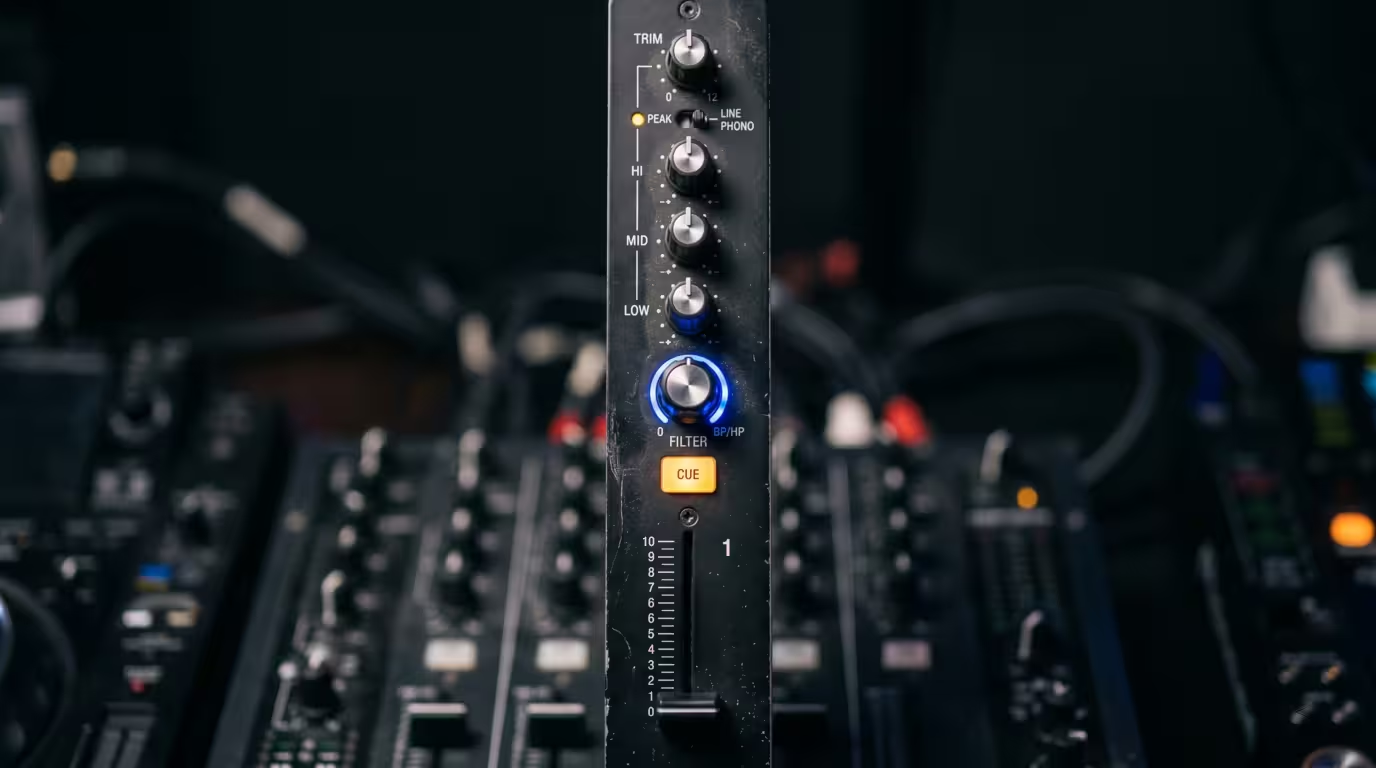
Channels and Input Selectors
A channel is a complete vertical strip of controls dedicated to one audio source. Mixers are described by their channel count, and that number tells you a lot about the intended use.
| Channel count | Typical use | Example models |
|---|---|---|
| 2-channel | Battle/scratch and home | DJM-S11, DJM-250MK2, Xone:23 |
| 4-channel | Club standard | DJM-900NXS2, DJM-A9 |
| 6-channel | Creative/large setups | DJM-V10, Xone:96 |
Each channel usually has an input selector that tells the mixer what kind of device is plugged in — commonly PHONO, LINE, or USB/digital. Choosing the right setting is essential, because phono and line are electrically very different (more on that below). On a club mixer like the four-channel Pioneer DJ DJM-900NXS2, every one of the four channels can take a turntable or a line-level player, and two USB ports let laptops feed audio in digitally. The six-channel DJM-V10 and Allen & Heath Xone:96 simply extend this idea, giving techno and improvisational DJs room to run drum machines, synths and multiple decks at once.
Channel Faders and the Crossfader
There are only two kinds of fader on any DJ mixer, and confusing them is one of the most common beginner mistakes. The vertical channel faders (also called line faders) move up and down and control the individual volume of each channel. The horizontal crossfader moves left and right and blends between two sides — the channels assigned to its left and to its right. With the crossfader hard left you hear only side A; hard right, only side B; in the middle, a blend of both.
In practice, many house and techno DJs barely touch the crossfader, preferring to run transitions on the channel faders and EQ because it gives smoother, more layered control. Scratch and turntablist DJs live on the crossfader, because its low resistance and adjustable cut let them open and close a channel in a split second.
That adjustability comes from the crossfader curve (or contour) control. A sharp, fast curve makes the sound cut in almost immediately as the fader leaves the edge — essential for scratching. A gentle curve spreads the volume change across the whole travel for smooth blends. Because the crossfader takes the most physical abuse on any mixer, premium units use contactless magnetic faders that have no scraping electrical contacts to wear out: Pioneer DJ's Magvel fader and the third-party innoFADER are the best-known examples. Pioneer DJ rates the DJM-900NXS2's Magvel fader for more than 10 million operations, and the innoFADER uses non-contact capacitance technology with on-board cut-in and curve adjustment, making it a popular replaceable upgrade across many mixers. Many mixers also support fader start: with a control cable connected, moving a channel fader or the crossfader starts and stops playback on a connected CDJ, returning it to its cue point when the fader is closed.
EQ: Shaping Each Channel's Tone
Every channel has its own equalizer, and on DJ mixers this is almost always a three-band EQ — high, mid and low — that lets you boost or cut treble, midrange and bass independently. EQ is not just for tone correction; it is a primary mixing tool. The classic move is the bass swap: cut the low band on the outgoing track while bringing up the low band on the incoming one, so two kick drums never fight for the same space.
There is an important distinction between a standard EQ and an isolator. A standard EQ cuts a band by a fixed amount — Pioneer DJ's switchable EQ, for instance, attenuates down to about −26 dB (its spec sheets list a 3-band EQ range of −26 dB to +6 dB). An isolator (or full-kill EQ) removes the band entirely when turned fully down, dropping it to negative infinity so the frequency disappears completely. Many Pioneer DJ mixers, including the DJM-450 and DJM-750MK2, let you switch each channel between standard EQ and isolator modes. The six-channel DJM-V10 goes further with a four-band EQ on every channel — its first ever — that fully kills highs and lows while giving two specially curved midrange bands, plus a separate three-band master isolator with oversized knobs for dramatic full-mix sweeps.
Trim, Gain and Level Metering
At the top of each channel is the trim (or gain) knob, which sets the input level of that channel before it reaches the fader. This is the heart of gain staging: setting each source so its loudest peaks sit just below the clipping point, leaving headroom but maximizing the signal-to-noise ratio. The standard practice is to set trims and EQ flat, then raise each channel's trim until its peaks register near the top of the channel level meter without going into the red. As Serato's gain-structure guide explains, pushing into the red does not make the system louder — it just clips and distorts the audio. The DJM-900NXS2 even adds per-channel red clip lights that spell out the problem so DJs and sound engineers can see when a channel is overloading.
Filters and Sound Color FX
Beyond EQ, most modern mixers give each channel a dedicated filter knob that sweeps a high-pass or low-pass filter — turn one way to strip out the bass, the other to remove the highs. This is a staple transition and build-up tool. Pioneer DJ packages this as Sound Color FX: a per-channel knob that defaults to a filter but can be switched to other textures like Noise, Crush, Dub Echo, Space or Sweep, with a parameter knob to add resonance and tension. The DJM-900NXS2 offers six such Sound Color FX on every channel. Allen & Heath takes a different, all-analogue route on the Xone series: its renowned VCF (voltage-controlled filter) offers low-pass, band-pass and high-pass with a resonance control that runs from gentle to extreme, and the Xone:96 adds a Crunch harmonic-distortion stage in front of the filter.
Effects, Send and Return
Separate from the color filters, most digital mixers have a dedicated effects (FX) section with beat- or BPM-synced effects such as reverb, delay/echo, flanger and roll. On Pioneer DJ mixers these are the Beat FX, tempo-locked so a delay or echo lands in time with the music; the DJM-900NXS2 carries 14 Beat FX controlled via a touch-sensitive X-Pad.
For DJs who want to use outboard hardware effects, a send/return (effects loop) routes the signal out to an external unit and back into the mix. The DJM-900NXS2 added an independent send/return that can patch in a hardware processor like Pioneer DJ's RMX-1000 (or its iPad app). The DJM-V10 expands this with two external sends plus four built-in send effects (Short Delay, Long Delay, Dub Echo and Reverb), and the Xone:96 provides two stereo sends and four stereo returns plus a master insert, with one send switchable to instrument level for guitar pedals.
Headphone Cue and Monitoring
The cue system is what makes a DJ mixer a DJ mixer. Each channel has a cue button that sends that channel to the headphones using PFL — pre-fade listen. As the name says, PFL taps the signal before the channel fader, so you can hear and prepare a track even with its fader all the way down and nothing reaching the speakers. This is how DJs preview the next track, find the right starting point, and beatmatch by ear before the audience hears anything.
The monitor section typically adds a cue/master mix knob — which blends between the cued channels and the main output in your headphones — and a separate cue level knob. Split cue is a related feature that sends the cued channel to one ear and the master mix to the other, so you can beatmatch the incoming track in one ear against what the room hears in the other. High-end mixers like the DJM-V10 and Xone:96 provide two completely independent headphone cue systems so two DJs can monitor different things during back-to-back sets and changeovers.
Inputs and Outputs
The back panel is where the mixer earns its place as the hub of the setup. The most important input distinction is phono versus line. A turntable's cartridge produces an extremely weak signal — on the order of a few millivolts — that is also deliberately bass-cut and treble-boosted according to the RIAA recording curve. A phono input runs that signal through a built-in phono preamplifier that both amplifies it to line level and applies the inverse RIAA equalization to restore a flat, natural response. A line input expects an already-strong, full-range signal from a CDJ, media player or laptop. Plug a turntable into a line input and you get a thin, quiet, distorted sound; plug a line source into a phono input and it will be deafeningly loud and distorted. Matching the input type to the source is non-negotiable. The connector and routing essentials look like this.
| Connection | What it carries | Connector |
|---|---|---|
| Phono in | Weak cartridge signal, RIAA-corrected | RCA + ground |
| Line in | Line-level players/laptops | RCA |
| Master out | Main mix to the PA | Balanced XLR / unbalanced RCA |
Beyond these, expect a microphone input (often balanced XLR, sometimes with phantom power on flagship units like the DJM-A9 for condenser mics), a booth output with its own independent level so the DJ's monitor can be louder or quieter than the room, and a record (REC) output for capturing the mix. The master output is usually offered on both balanced XLR — the professional standard, resistant to noise over long cable runs — and unbalanced RCA. Many mixers also carry digital outputs (S/PDIF or AES/EBU) and the send/return jacks discussed above.
Soundcard, DVS and Digital Integration
A defining feature of modern club mixers is a built-in multi-channel USB soundcard, which lets the mixer double as the computer's audio interface. Pioneer DJ describes the DJM-900NXS2's built-in USB sound card as handling four ins and five outs of stereo signal simultaneously at 96 kHz/24-bit, and its two USB ports mean two laptops can be connected at once for seamless back-to-back changeovers. The Xone:96 goes even further with two independent soundcards offering up to 24 channels of I/O.
This soundcard is what enables DVS — a digital vinyl system. With a DVS-enabled mixer, special timecode control vinyl (or CDs) plays on the turntables; the mixer's soundcard converts that timecode into data that DJ software like rekordbox DVS or Serato DJ Pro reads to control the position, speed and direction of digital tracks. The result is the tactile feel of vinyl with a digital library. Notably, even the entry-level DJM-250MK2 ships with a soundcard and bundled rekordbox DVS, making it one of the cheapest routes into digital vinyl.
Home, Club and Battle Mixers Compared
Mixers fall into a few broad tiers. Entry/home mixers are 2-channel units with fewer features but real pro DNA. The Pioneer DJ DJM-250MK2 is the entry point to the DJM line — a 2-channel mixer with the Magvel crossfader and Sound Color filter inherited from the flagship, three-band isolators and a rekordbox DVS soundcard; it launched in 2017 at a €349 SRP and now sells for around $419 in the US. The DJM-450 steps up with full Beat FX, switchable EQ/isolator and a send/return, making it a near-shrunken club mixer at roughly $700.
Club-standard mixers are the 4-channel workhorses installed in venues. For years the Pioneer DJ DJM-900NXS2 has been the de facto industry standard; it has now been succeeded by the DJM-A9 (about $2,899), which keeps the familiar layout but upgrades to 32-bit ESS converters, adds Bluetooth input and a phantom-powered mic input, and pairs with the CDJ-3000. Above them sits the 6-channel DJM-V10 (around $3,899) with its 4-band EQ and per-channel compressor, aimed at creative and techno DJs. Allen & Heath's Xone:96 (about $2,499) is the analogue alternative in this tier — a 6-channel mixer with dual VCF filters, dual soundcards and a beloved warm analogue sound — while the Xone:23 covers the affordable 2+2 analogue niche at roughly $380 to $450.
Battle mixers are 2-channel units optimized for scratching: a tight layout, performance pads, and a premium adjustable crossfader. Pioneer DJ's DJM-S series (the DJM-S11 at about $2,269 and the DJM-S7 at about $1,449) is built around Serato DJ Pro and the Magvel Fader Pro, while Rane's Seventy and Seventy-Two use contactless MAG FOUR faders with external tension adjustment, around $1,499. These prioritize crossfader feel and cut response over channel count. Roughly, here is how the tiers compare on price.
| Tier | Channels | Approx. US price |
|---|---|---|
| Entry/home | 2 | $400–$700 |
| Club standard | 4 | $2,500–$2,900 |
| Flagship/creative | 6 | $2,500–$3,900 |
Build quality scales with price too: entry mixers use lighter construction, while club and battle units have full metal chassis built to survive touring and nightly abuse.
A Brief History and the Rotary Tradition
The DJ mixer was born from a simple need: a single device that let one person fade smoothly between two records while previewing the next in headphones. Audio engineer Alex Rosner built an early three-channel device with sliders and a cueing function, nicknamed Rosie, in 1971 for New York DJ Francis Grasso at the club Haven, and around the same time Rudy Bozak's CMA-10-2DL became the first commercially available DJ mixer — a rotary design with knobs rather than faders. The UREI 1620, released in the early 1980s and based on Bozak's circuitry, became the standard for disco and house booths.
These classics were rotary mixers: they used rotary volume knobs instead of sliding faders, prized for smooth, precise level control and a warm sound. As hip-hop and scratch culture exploded in the 1980s, the crossfader and the slider-based battle layout took over the mainstream, and rotary mixers became a niche. They never disappeared, though. A revival began in 2003 when Parisian DJ Deep asked engineer Jérôme Barbé to repair his vintage UREI, leading to the boutique, hand-built E&S DJR400 — E&S still produces no more than around 100 custom-made mixers a year, each soldered and assembled by hand in Barbé's Paris workshop. Today rotary mixers from MasterSounds/Union Audio, Condesa and a reissued Bozak serve house and disco DJs who value sound quality and a hands-on mixing style. It is a reminder that, however many digital features a modern mixer packs in, its fundamental job has not changed since 1971.
Key takeaways
• A DJ mixer combines multiple sources, lets you cue and preview them in headphones, and outputs one blended signal to the speakers.
• Channel faders set individual volumes; the crossfader blends between two assigned sides, with an adjustable curve for scratching or smooth blends.
• EQ (especially full-kill isolators), trim and gain staging, per-channel filters and beat-synced FX are your main creative and mixing tools.
• Match phono inputs to turntables (RIAA preamp) and line inputs to players; the master out is on balanced XLR or unbalanced RCA.
• Built-in USB soundcards enable DVS and laptop integration; club mixers are 4-channel workhorses while battle mixers are 2-channel scratch tools.
• The rotary mixer — knobs instead of faders — is the format's original form and survives as a premium niche.
Ready-made, exclusive EDM tracks with full rights — released as your own.
